Adya · AI Voice Agent · AI Product Manager
Building Adya's AI Voice Agent — Zero to Enterprise
How I built a Voice AI platform from scratch as AI Product Manager — from customer discovery and architecture decisions to custom agent deployments and enterprise sales. Pitched to 15+ enterprise prospects and converted 4 into paying pilots.
The Problem
Customer support in India runs almost entirely on human agents. For small and medium businesses, this creates a compounding set of problems that are hard to fix with headcount alone:
- Cost — Hiring, training, and managing a support team is expensive at every scale, and agent attrition compounds it.
- Coverage — Human agents work shifts. Customers don't. Calls that come in at night or during peak hours either go unanswered or hit long queues.
- Consistency — The quality of a customer interaction depends on which agent picks up and how well they're trained. That variability is invisible until it's already cost you a customer.
- Speed — A customer with a billing question or delivery issue wants an answer immediately, not after an IVR tree and a hold queue.
A voice AI agent that could handle these calls around the clock — in natural, context-aware conversation — would directly replace the most expensive and brittle part of the customer support stack.
Product Architecture
The platform (internally called V2V — Voice-to-Voice) supports two distinct architectures, which I designed as first-class choices in the product rather than hidden configuration:
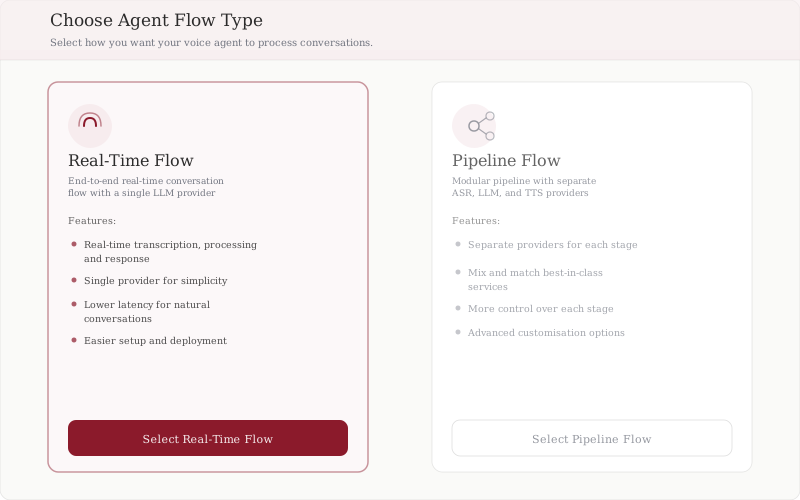
Real-Time Flow routes the entire conversation through a single LLM provider end-to-end. The call is transcribed, processed, and responded to in real time by one model. This produces lower latency — critical for natural-feeling phone conversations — and is significantly easier for customers to configure and deploy.
Pipeline Flow is a modular architecture where each stage of the conversation is handled by a separately configured provider:
| Stage | Provider Type | Purpose |
|---|---|---|
| ASR (Automatic Speech Recognition) | Speech-to-text | Transcribes the caller's voice in real time |
| LLM (Large Language Model) | Language model | Generates the response |
| TTS (Text-to-Speech) | Voice synthesis | Converts the response to speech |
Pipeline mode gives enterprise customers the ability to mix and match best-in-class services at each layer — for example, using a specialised Indian-language ASR model, a fine-tuned LLM, and a specific TTS voice. The tradeoff is additional latency from chaining three separate provider calls and higher configuration overhead.
This architecture decision — surfacing both options with a clear comparison rather than hiding complexity — was a product judgment call. Most early customers started on Real-Time Flow and moved to Pipeline only when they had specific provider requirements.
Agent Configuration
Every agent on the platform is configured through a 10-step builder that progressively captures everything needed to deploy a working voice agent:
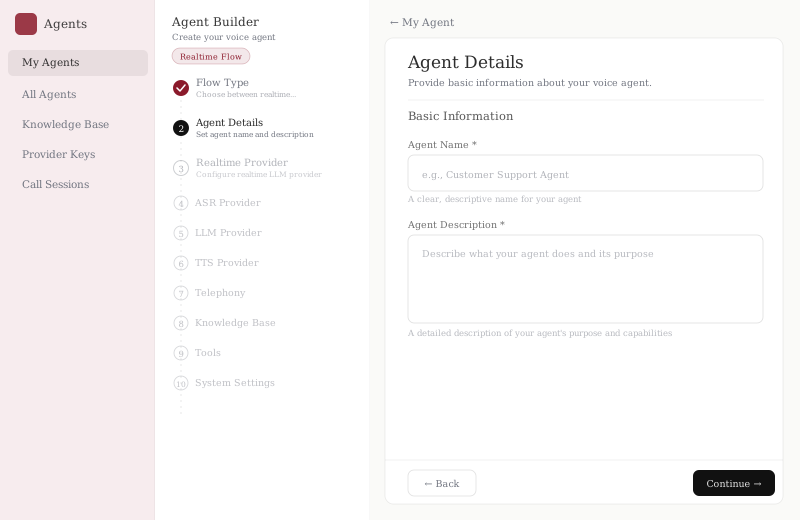
The builder steps in sequence:
- Flow Type — Real-Time or Pipeline (see above)
- Agent Details — Name, description, and agent persona
- Realtime Provider — LLM configuration for Real-Time mode
- ASR Provider — Speech-to-text configuration for Pipeline mode
- LLM Provider — Language model for Pipeline mode
- TTS Provider — Voice synthesis and voice selection
- Telephony — Phone number provisioning and call routing rules
- Knowledge Base — Custom documents, FAQs, and product information the agent uses to answer questions
- Tools — External API integrations (CRM lookups, appointment systems, order status APIs)
- System Settings — Conversation parameters, escalation rules, call recording preferences
The Knowledge Base and Tools steps were among the most important product decisions. A generic LLM can hold a conversation — but it cannot accurately answer "what's the status of order #48291" without access to real data. By making tool integrations a first-class configuration step rather than a developer-only feature, we let customers deploy agents that were genuinely useful for their specific workflows without engineering support.
For each new enterprise client, I handled the agent configuration end-to-end: mapping their use case to the right flow type, importing their knowledge base documents, configuring escalation thresholds, and testing the call flow before go-live.
Campaign Management
For outbound use cases — payment reminders, appointment confirmations, lead qualification, customer surveys — the platform supports campaign management: uploading contact lists, scheduling batch calls, and collecting structured outcomes per call.
This was the feature that most directly replaced repetitive human outbound calling. A team that previously spent 4 hours a day on follow-up calls could configure a campaign in 15 minutes and receive structured results — call outcome, duration, sentiment, AI summary — without touching a phone.
Live Analytics
Every deployment produces real-time analytics. Here is the actual production dashboard from a live client deployment:
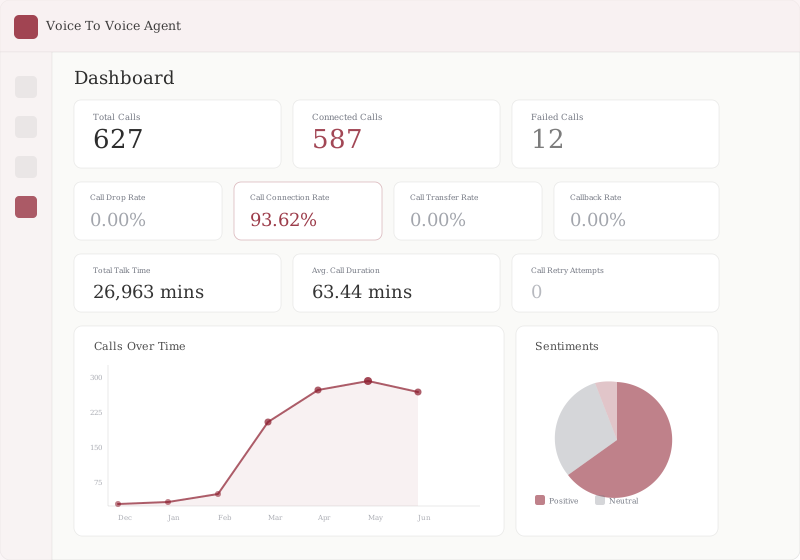
Key metrics from production:
| Metric | Value |
|---|---|
| Call connection rate | 93.62% |
| Availability | 24/7 |
| Primary use cases | Inbound support, outbound campaigns, lead qualification, appointment booking |
The calls-over-time chart shows the ramp from the initial December 2024 deployment through scaling across the pilot period to May–June 2025. The sentiments panel surfaces the distribution of caller sentiment — a signal used by supervisors to flag calls for human review.
My Role
I joined Adya as AI Product Manager for this product and built it from zero to one. That meant no existing product, no defined spec, and no prior customer reference point.
Customer Discovery — I spoke with SMBs across retail, logistics, clinics, and financial services to map where phone calls were creating the most friction. The pattern: high-volume, repetitive calls (order status, appointment reminders, payment follow-ups) were consuming the most agent time and were the most automatable.
Product Definition — I translated those conversations into a product architecture: what the platform needed to do, what customisation options customers required, and what the minimum viable version looked like.
UI and Configuration Design — I defined the customer-facing dashboard — the agent builder flow, campaign management interface, analytics views, and supervisor tools.
Custom Deployments — For each enterprise client, I configured the agent: adapting call flows, scripts, knowledge bases, and escalation rules to their specific use case. This was hands-on work that also served as the primary onboarding touchpoint.
Technical Demos — I ran product demonstrations directly with enterprise prospects — walking through the platform, showing live call examples, and handling technical questions. Being the PM who could also demo removed a handoff that would have significantly slowed the sales cycle.
Iteration — Every deployment surfaced something. I managed the feedback loop across versions — prioritising changes that improved call quality, reduced setup time, and unlocked new use cases.
Outcomes
| Metric | Result |
|---|---|
| Enterprise prospects pitched to | 15+ |
| Paying pilots converted | 4 |
| Availability | 24/7 vs. business hours only |
| Primary use cases | Inbound support, outbound campaigns, lead qualification, appointment booking |
The paying pilots represented the hardest validation in B2B enterprise sales: companies willing to commit budget to a new AI product in a category that didn't exist in their vendor landscape six months prior.
Product documentation at docs.adya.ai. Adya's own product update shows the platform in production.